

To be honest, I came to know of Midjourney AI long after I knew OpenAI's overhyped consumer app Sora that was eventually discontinued due to unsustainable computing costs, legal and ethical risks. The insane virality of Sora-generated video shorts on X social platform were believed to be the next AI boom after the virality of ChatGPT. Unfortunately, that hype plunged into oblivion. Then Midjourney was the spotlight, becoming one of the most sought-after AI tools to create stunning visuals.
In fact, it became the talk of the town when a controversial Midjourney-created image by an American called Jason M. Alen won the best award at the Colorado State Fair, following which he mocked real artists; declaring, in his own pejorative term, that art is dead.
This writing is a detailed breakdown of Midjourney AI and will walk you through every detail as a guidebook to this photorealistic image generating tool.
What is Midjourney AI? Is it free?
Midjourney or Midjourney AI is basically an AI-powered tool to create breathtaking visuals based on prompts. On its website, it is officiated as a community-funded research lab of 60 people working with a common mission to build the most beautiful AI models in the world. Midjourney, as a generative AI program and service, creates images similar to how DALL-E of OpenAI and Stable Diffusion of Stability AI creates prompt-based images.
Midjourney can’t generate a full-length video from scratch based on a pure prompt. It mostly animates an image.
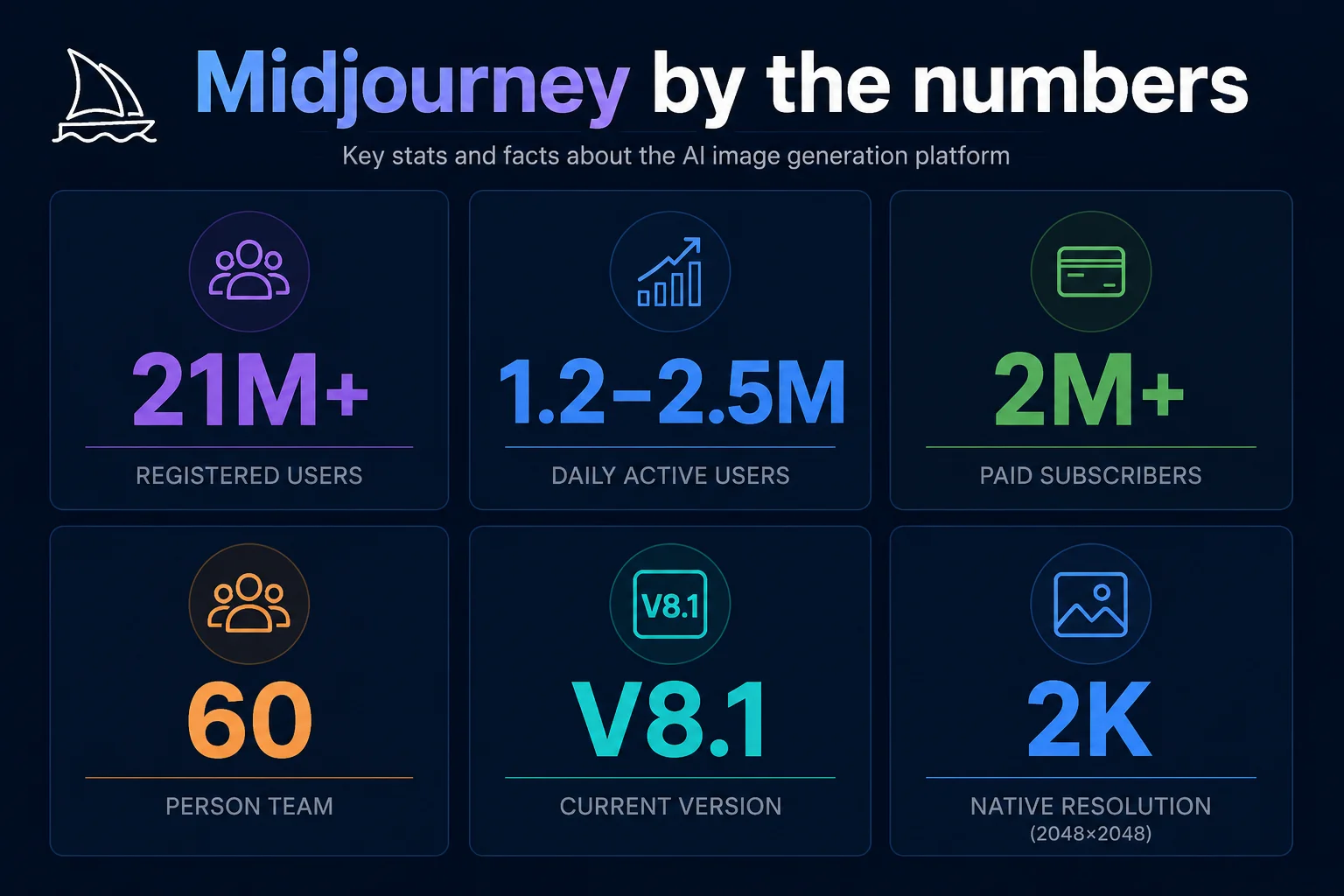
As of late April 2026, V8.1 is the most latest version of Midjourney AI, featuring highly consistent aesthetics or visual consistency, native 2k resolution generation, 50% faster standard resolution, and intelligent conversation mode. As far as use of this image generating tool is concerned, it is not free. There is no free trial or free version of the tool on its official website. David Holz is the founder and CEO of Midjourney.
Key Features of Midjourney AI
Generates text-based images - Based on the (detailed) prompts, the tool creates stunning, high-quality image variations within seconds. It can even decode complex prompts to create stunning visuals, mastering lighting, composition and different artistic styles.
Image generations based on parameters - To guide the tool to create the kind of image you want in alignment with composition and colors, you can upload a reference image and choose specific parameter-settings. For instance, choose the parameter Style Reference for aesthetic, color palette and visual vibe you want in your desired image. For character consistency of multiple image generations, choose Character Reference parameter.
Vary and Edit tools -These tools in Midjourney are powerful AI editing features, allowing users to modify currently generated images or uploaded photos. For instance, Vary allows you to edit or replace specific parts of the photo, while Zoom Out and Pan allow you to extend the canvas.
The Describe command - The Describe feature in Midjourney is an image-to-text tool that allows users to explore more creative prompts by analyzing an uploaded image. In other words, the feature creates four distinct prompts based on the style, lighting, subject, and composition of an uploaded image. Just type /describe in the message bar and hit enter. The Midjourney Bot will analyze the image you uploaded and give four prompt suggestions.
Conversation mode - As a user, you can chat directly with Midjourney Bot using natural language and voice to brainstorm ideas without typing complex prompts.
Style & consistency control - Midjourney features tools like Omni/character reference, Style explorer & codes, and Describe to generate images based on your exact requirements.
Read Also: What Is Janitor AI? Features, Uses, and How It Works
Getting Started with Midjourney AI
Since Midjourney doesn't run on an app like other image generating tools, you need to have an account on Discord. So, sign up using your Discord or Google account to claim your username. This is where you enter the home page of the Midjourney post successful sign up. It is worth noting to have some clarity of what you want to create.
A Guide to Using Midjourney AI
Choose the platform and enter a prompt
If accessing Mirjourney using a web interface, use the Imagine bar at the top. If accessing the tool via Discord, type the /imagine command in any channel. Don't forget to choose the version. For instance, under "version", confirm V8.1 is selected.
Write your prompt
The thing about the version, V8.1 is that it is an advanced language encoder which means being able to creatively describe your prompts by being highly specific and detailed. You can also consider conversation mode found at the top right of the Midjourney AI interface for a more optimized prompt. Someone who knows the science of creating creative text prompts can maximize the tool best.
PRO TIP: I know creating a detailed and thorough prompt is not easy. Perhaps nobody is that imaginative. Therefore, choose LLMs like ChatGPT or Gemini and command it to create a detailed prompt that you can use in Midjourney to create stunning visuals. Instruct the LLM to use short sentences and commas wherever necessary, as Midjourney parses comma-separated keywords. Also, if you have an image based on which you want to create another beautiful image, just upload that image in Midjourney and let the tool give you four different prompts. This will make your task of creating a great visual easier.
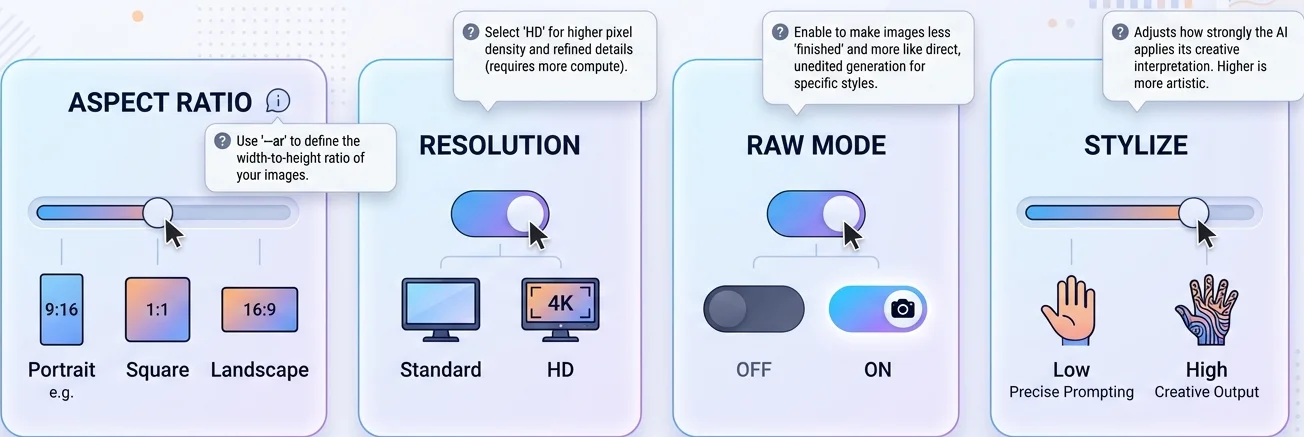
Choose The Best Settings For Your Image Generation
Aspect ratio - Consider Portrait, Square or landscape depending on your image needs.
HD or Standard - Choose the picture resolution based on your needs. For instance, choose HD for more detailing in the image, Standard for exploring ideas quickly.
Raw - This setting is recommended if you look for highly specific prompts. It gives more photographic or raw results.
Stylize - Use this parameter as a slider for your creative freedom. It changes how much creativity is applied to your image. For instance, low Stylize prompts the AI to create an image exactly based on your prompt. Higher values prompts AI to create more visually striking images.
Submit Your Prompt And Edit Your Image
Now, submit your creatively worded prompt to the paper plan icon right to the prompt bar. Let it process the prompt and create the image. Once you see the image is ready, look for something that feels off. If yes, adjust your prompt slightly and give it another shot to see the difference.
Midjourney AI: Use Cases
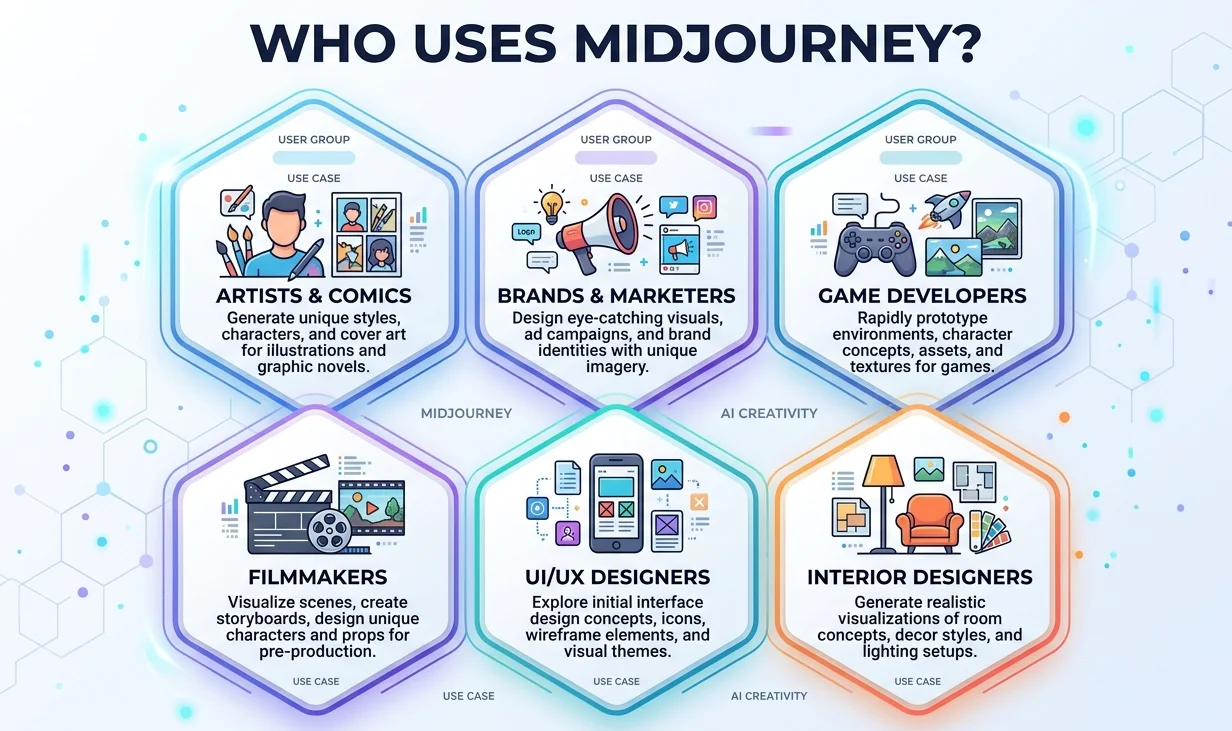
Being an advanced image generating AI tool, the application areas of Midjourney AI are quite diverse. It is used by creatives and professionals around the world to bring texts to life.
The key applications of Midjourney:
Artists use Midjourney to design characters, backgrounds and entire scenes for graphic novels and comics, apart from visual guides and prototype storyboards.
Brands and marketers use it to create impactful visuals for social media, ad campaigns and product launches.
It is used by game developers and filmmakers to visualize characters, environments, props and atmospheres in the creative process. The use of the tool also involves exploring visual directions, building mood boards and refinement of aesthetics before moving to 3D modeling or filming.
Designers use this tool to ideate and visualize user interfaces, mobile app screens and product concepts.
It is also used in interior design where the tool helps designers to generate various room settings and lighting perspectives based on uploaded reference images like a piece of furniture.
Midjourney Subscription Plans
The following tabulated data gives a detailed breakdown of Midhourney pricing and plans. It is essential, because being a paid tool, each plan is designed for different users.
Feature / Parameter | Basic Plan | Standard Plan | Pro Plan | Mega Plan |
Monthly Price | $10 | $30 | $60 | $120 |
Annual Price | $96 ($8/month) | $288 ($24/month) | $576 ($48/month) | $1,152 ($96/month) |
Fast GPU Time | 3.3 hr/month (200 minutes) | 15 hr/month | 30 hr/month | 60 hr/month |
Relax GPU Time | Not Available | Unlimited Images | Unlimited Images & SD Video | Unlimited Images & SD Video |
Video Resolution | SD | SD & HD | SD & HD | SD & HD |
Purchase Extra GPU Time | $4/hr | $4/hr | $4/hr | $4/hr |
Work Solo in Discord Direct Messages | Yes | Yes | Yes | Yes |
Stealth Mode | No | No | Yes | Yes |
Maximum Concurrent Prompts (Images) | 3 Fast | 3 Fast or Relax | 12 Fast or 3 Relax | 12 Fast or 3 Relax |
Maximum Concurrent Prompts (Videos) | 1 Fast | 3 Fast | 6 Fast or 3 Relax | 12 Fast or 3 Relax |
Maximum Repeat / Permutation Size | 4 jobs | 10 jobs | 40 jobs | 40 jobs |
Maximum Queued Jobs | 10 jobs | 10 jobs | 10 jobs* (3 Relax videos) | 10 jobs* (3 Relax videos) |
Rate Images to Earn Free GPU Time | Yes | Yes | Yes | Yes |
Usage Rights | General Commercial Terms | General Commercial Terms | General Commercial Terms | General Commercial Terms |
Source data: Midjourney
Pros and Cons of Midjourney AI
With over 21 million registered users, no doubt Midjourney is one of the most popular and highly-used AI tools for image generations in the world. The platform experiences 1.2 million to 2.5 million daily active users, and over 2 million users are its active paid subscribers. However, an AI tool that is globally so popular also needs to be analyzed from the perspective of whether it is viable for everyone. And this will lead us to better understand the tool.
Pros of Midjourney AI
It can produce highly detailed, photorealistic images based on prompts.
Generated images can be finetuned using specific parameters.
Allows users to upload reference images to maintain character consistency across image generations.
Allows users to animate video stills and extend them into dynamic clips.
Allows real time collaboration when signed in using Discord
Rollout of new updates that maintains prompt adherence.
Cons of Midjourney AI
It is strictly based on the subscription pricing model, no free trial at all.
Paid users can commercially use the generated images and videos by Midjourney but it is subject to some revenue limitations. In addition, the risk of deepfaking those digital assets always lingers if you are not a paid subscriber for a higher tier plan to access ‘Stealth Mode’ that hides your generated digital assets from the public gallery on its site.
Midjourney has stated that all the generated digital assets can be used to train future machine learning algorithms, hence the loss of exclusive creativity for users on their own created assets.
Users who have subscribed to basic and standard plans may face usage limitations or licensing constraints.
Using the true potential of the Midjourney may require users to learn specific parameters syntax.
Final Words
Midjourney AI is a powerful image-generating tool to create highly-detailed and photorealistic images based on prompts. Advanced settings of the tool enable users to modify generated images. Versatility of the tool is the reason behind its growing popularity, with application areas in different segments, including marketing, storytelling and filmmaking.
Though a highly productive tool, it is also not without some flaws, including being strictly tied to the subscription model. To make the most out of Midjourney, users are advised to be creative in generating detailed prompts that the tool can understand and so generate the best images. However, they can start with simple prompts till they get a good hang of what it takes to create impactful prompts.
Careerera Editorial Team
The Careerera Editorial Team is a collaborative group of education writers, researchers, editors, content strategists, and subject matter experts dedicated to creating accurate, well-researched, and learner-focused content across technology, business, and professional education. Every article follows a structured editorial process that includes research, source verification, editorial review, and quality assurance before publication. The team references recognized academic institutions, certification bodies, industry research, and authoritative publications to deliver trusted content that helps learners and professionals make informed education and career decisions.
Learn how we research, review, and update our content. Editorial Standards & Review Process.

Latest Blogs
8 Why Your PMO Is Dying, and How PRINCE2 7 Could Save It
 Is PRINCE2 Certification Still Worth It in 2026? An Honest ROI Breakdown
 Top 20 Toughest Exams in the World 2026: Students Guide
 $100 Billion AI Automation Boom: Why Businesses Are Investing More in 2026
 CISSP vs. CISA: Which Cybersecurity Certification Controls Your Career?
 What is Continual Learning in AI and Machine Learning?
  What are the Major Benefits of Online DBA Programs?
 CMAT 2027: Exam Date, Syllabus, Exam Pattern, Preparation Tips & FAQs
Featured Courses

To be honest, I came to know of Midjourney AI long after I knew OpenAI's overhyped consumer app Sora that was eventually discontinued due to unsustainable computing costs, legal and ethical risks. The insane virality of Sora-generated video shorts on X social platform were believed to be the next AI boom after the virality of ChatGPT. Unfortunately, that hype plunged into oblivion. Then Midjourney was the spotlight, becoming one of the most sought-after AI tools to create stunning visuals.
In fact, it became the talk of the town when a controversial Midjourney-created image by an American called Jason M. Alen won the best award at the Colorado State Fair, following which he mocked real artists; declaring, in his own pejorative term, that art is dead.
This writing is a detailed breakdown of Midjourney AI and will walk you through every detail as a guidebook to this photorealistic image generating tool.
What is Midjourney AI? Is it free?
Midjourney or Midjourney AI is basically an AI-powered tool to create breathtaking visuals based on prompts. On its website, it is officiated as a community-funded research lab of 60 people working with a common mission to build the most beautiful AI models in the world. Midjourney, as a generative AI program and service, creates images similar to how DALL-E of OpenAI and Stable Diffusion of Stability AI creates prompt-based images.
Midjourney can’t generate a full-length video from scratch based on a pure prompt. It mostly animates an image.
As of late April 2026, V8.1 is the most latest version of Midjourney AI, featuring highly consistent aesthetics or visual consistency, native 2k resolution generation, 50% faster standard resolution, and intelligent conversation mode. As far as use of this image generating tool is concerned, it is not free. There is no free trial or free version of the tool on its official website. David Holz is the founder and CEO of Midjourney.
Key Features of Midjourney AI
Generates text-based images - Based on the (detailed) prompts, the tool creates stunning, high-quality image variations within seconds. It can even decode complex prompts to create stunning visuals, mastering lighting, composition and different artistic styles.
Image generations based on parameters - To guide the tool to create the kind of image you want in alignment with composition and colors, you can upload a reference image and choose specific parameter-settings. For instance, choose the parameter Style Reference for aesthetic, color palette and visual vibe you want in your desired image. For character consistency of multiple image generations, choose Character Reference parameter.
Vary and Edit tools -These tools in Midjourney are powerful AI editing features, allowing users to modify currently generated images or uploaded photos. For instance, Vary allows you to edit or replace specific parts of the photo, while Zoom Out and Pan allow you to extend the canvas.
The Describe command - The Describe feature in Midjourney is an image-to-text tool that allows users to explore more creative prompts by analyzing an uploaded image. In other words, the feature creates four distinct prompts based on the style, lighting, subject, and composition of an uploaded image. Just type /describe in the message bar and hit enter. The Midjourney Bot will analyze the image you uploaded and give four prompt suggestions.
Conversation mode - As a user, you can chat directly with Midjourney Bot using natural language and voice to brainstorm ideas without typing complex prompts.
Style & consistency control - Midjourney features tools like Omni/character reference, Style explorer & codes, and Describe to generate images based on your exact requirements.
Read Also: What Is Janitor AI? Features, Uses, and How It Works
Getting Started with Midjourney AI
Since Midjourney doesn't run on an app like other image generating tools, you need to have an account on Discord. So, sign up using your Discord or Google account to claim your username. This is where you enter the home page of the Midjourney post successful sign up. It is worth noting to have some clarity of what you want to create.
A Guide to Using Midjourney AI
Choose the platform and enter a prompt
If accessing Mirjourney using a web interface, use the Imagine bar at the top. If accessing the tool via Discord, type the /imagine command in any channel. Don't forget to choose the version. For instance, under "version", confirm V8.1 is selected.
Write your prompt
The thing about the version, V8.1 is that it is an advanced language encoder which means being able to creatively describe your prompts by being highly specific and detailed. You can also consider conversation mode found at the top right of the Midjourney AI interface for a more optimized prompt. Someone who knows the science of creating creative text prompts can maximize the tool best.
PRO TIP: I know creating a detailed and thorough prompt is not easy. Perhaps nobody is that imaginative. Therefore, choose LLMs like ChatGPT or Gemini and command it to create a detailed prompt that you can use in Midjourney to create stunning visuals. Instruct the LLM to use short sentences and commas wherever necessary, as Midjourney parses comma-separated keywords. Also, if you have an image based on which you want to create another beautiful image, just upload that image in Midjourney and let the tool give you four different prompts. This will make your task of creating a great visual easier.
Choose The Best Settings For Your Image Generation
Aspect ratio - Consider Portrait, Square or landscape depending on your image needs.
HD or Standard - Choose the picture resolution based on your needs. For instance, choose HD for more detailing in the image, Standard for exploring ideas quickly.
Raw - This setting is recommended if you look for highly specific prompts. It gives more photographic or raw results.
Stylize - Use this parameter as a slider for your creative freedom. It changes how much creativity is applied to your image. For instance, low Stylize prompts the AI to create an image exactly based on your prompt. Higher values prompts AI to create more visually striking images.
Submit Your Prompt And Edit Your Image
Now, submit your creatively worded prompt to the paper plan icon right to the prompt bar. Let it process the prompt and create the image. Once you see the image is ready, look for something that feels off. If yes, adjust your prompt slightly and give it another shot to see the difference.
Midjourney AI: Use Cases
Being an advanced image generating AI tool, the application areas of Midjourney AI are quite diverse. It is used by creatives and professionals around the world to bring texts to life.
The key applications of Midjourney:
Artists use Midjourney to design characters, backgrounds and entire scenes for graphic novels and comics, apart from visual guides and prototype storyboards.
Brands and marketers use it to create impactful visuals for social media, ad campaigns and product launches.
It is used by game developers and filmmakers to visualize characters, environments, props and atmospheres in the creative process. The use of the tool also involves exploring visual directions, building mood boards and refinement of aesthetics before moving to 3D modeling or filming.
Designers use this tool to ideate and visualize user interfaces, mobile app screens and product concepts.
It is also used in interior design where the tool helps designers to generate various room settings and lighting perspectives based on uploaded reference images like a piece of furniture.
Midjourney Subscription Plans
The following tabulated data gives a detailed breakdown of Midhourney pricing and plans. It is essential, because being a paid tool, each plan is designed for different users.
Feature / Parameter | Basic Plan | Standard Plan | Pro Plan | Mega Plan |
Monthly Price | $10 | $30 | $60 | $120 |
Annual Price | $96 ($8/month) | $288 ($24/month) | $576 ($48/month) | $1,152 ($96/month) |
Fast GPU Time | 3.3 hr/month (200 minutes) | 15 hr/month | 30 hr/month | 60 hr/month |
Relax GPU Time | Not Available | Unlimited Images | Unlimited Images & SD Video | Unlimited Images & SD Video |
Video Resolution | SD | SD & HD | SD & HD | SD & HD |
Purchase Extra GPU Time | $4/hr | $4/hr | $4/hr | $4/hr |
Work Solo in Discord Direct Messages | Yes | Yes | Yes | Yes |
Stealth Mode | No | No | Yes | Yes |
Maximum Concurrent Prompts (Images) | 3 Fast | 3 Fast or Relax | 12 Fast or 3 Relax | 12 Fast or 3 Relax |
Maximum Concurrent Prompts (Videos) | 1 Fast | 3 Fast | 6 Fast or 3 Relax | 12 Fast or 3 Relax |
Maximum Repeat / Permutation Size | 4 jobs | 10 jobs | 40 jobs | 40 jobs |
Maximum Queued Jobs | 10 jobs | 10 jobs | 10 jobs* (3 Relax videos) | 10 jobs* (3 Relax videos) |
Rate Images to Earn Free GPU Time | Yes | Yes | Yes | Yes |
Usage Rights | General Commercial Terms | General Commercial Terms | General Commercial Terms | General Commercial Terms |
Source data: Midjourney
Pros and Cons of Midjourney AI
With over 21 million registered users, no doubt Midjourney is one of the most popular and highly-used AI tools for image generations in the world. The platform experiences 1.2 million to 2.5 million daily active users, and over 2 million users are its active paid subscribers. However, an AI tool that is globally so popular also needs to be analyzed from the perspective of whether it is viable for everyone. And this will lead us to better understand the tool.
Pros of Midjourney AI
It can produce highly detailed, photorealistic images based on prompts.
Generated images can be finetuned using specific parameters.
Allows users to upload reference images to maintain character consistency across image generations.
Allows users to animate video stills and extend them into dynamic clips.
Allows real time collaboration when signed in using Discord
Rollout of new updates that maintains prompt adherence.
Cons of Midjourney AI
It is strictly based on the subscription pricing model, no free trial at all.
Paid users can commercially use the generated images and videos by Midjourney but it is subject to some revenue limitations. In addition, the risk of deepfaking those digital assets always lingers if you are not a paid subscriber for a higher tier plan to access ‘Stealth Mode’ that hides your generated digital assets from the public gallery on its site.
Midjourney has stated that all the generated digital assets can be used to train future machine learning algorithms, hence the loss of exclusive creativity for users on their own created assets.
Users who have subscribed to basic and standard plans may face usage limitations or licensing constraints.
Using the true potential of the Midjourney may require users to learn specific parameters syntax.
Final Words
Midjourney AI is a powerful image-generating tool to create highly-detailed and photorealistic images based on prompts. Advanced settings of the tool enable users to modify generated images. Versatility of the tool is the reason behind its growing popularity, with application areas in different segments, including marketing, storytelling and filmmaking.
Though a highly productive tool, it is also not without some flaws, including being strictly tied to the subscription model. To make the most out of Midjourney, users are advised to be creative in generating detailed prompts that the tool can understand and so generate the best images. However, they can start with simple prompts till they get a good hang of what it takes to create impactful prompts.
Latest Blogs
8- Why Your PMO Is Dying, and How PRINCE2 7 Could Save It
- Is PRINCE2 Certification Still Worth It in 2026? An Honest ROI Breakdown
- Top 20 Toughest Exams in the World 2026: Students Guide
- $100 Billion AI Automation Boom: Why Businesses Are Investing More in 2026
- CISSP vs. CISA: Which Cybersecurity Certification Controls Your Career?
- What is Continual Learning in AI and Machine Learning?
- What are the Major Benefits of Online DBA Programs?
- CMAT 2027: Exam Date, Syllabus, Exam Pattern, Preparation Tips & FAQs
Careerera Editorial Team
The Careerera Editorial Team is a collaborative group of education writers, researchers, editors, content strategists, and subject matter experts dedicated to creating accurate, well-researched, and learner-focused content across technology, business, and professional education. Every article follows a structured editorial process that includes research, source verification, editorial review, and quality assurance before publication. The team references recognized academic institutions, certification bodies, industry research, and authoritative publications to deliver trusted content that helps learners and professionals make informed education and career decisions.
Learn how we research, review, and update our content. Editorial Standards & Review Process.