

Building two separate apps — one for iOS and one for Android — used to be the only serious option. That changed entirely with Hybrid Frameworks which now let a single team write one codebase and ship to both platforms (plus web and desktop in many cases) without sacrificing meaningful performance. This guide covers the top ten major players — their architecture, real–world use case, and when to pick which.
What Do You Understand About Hybrid and Cross–Platform Mobile Frameworks?
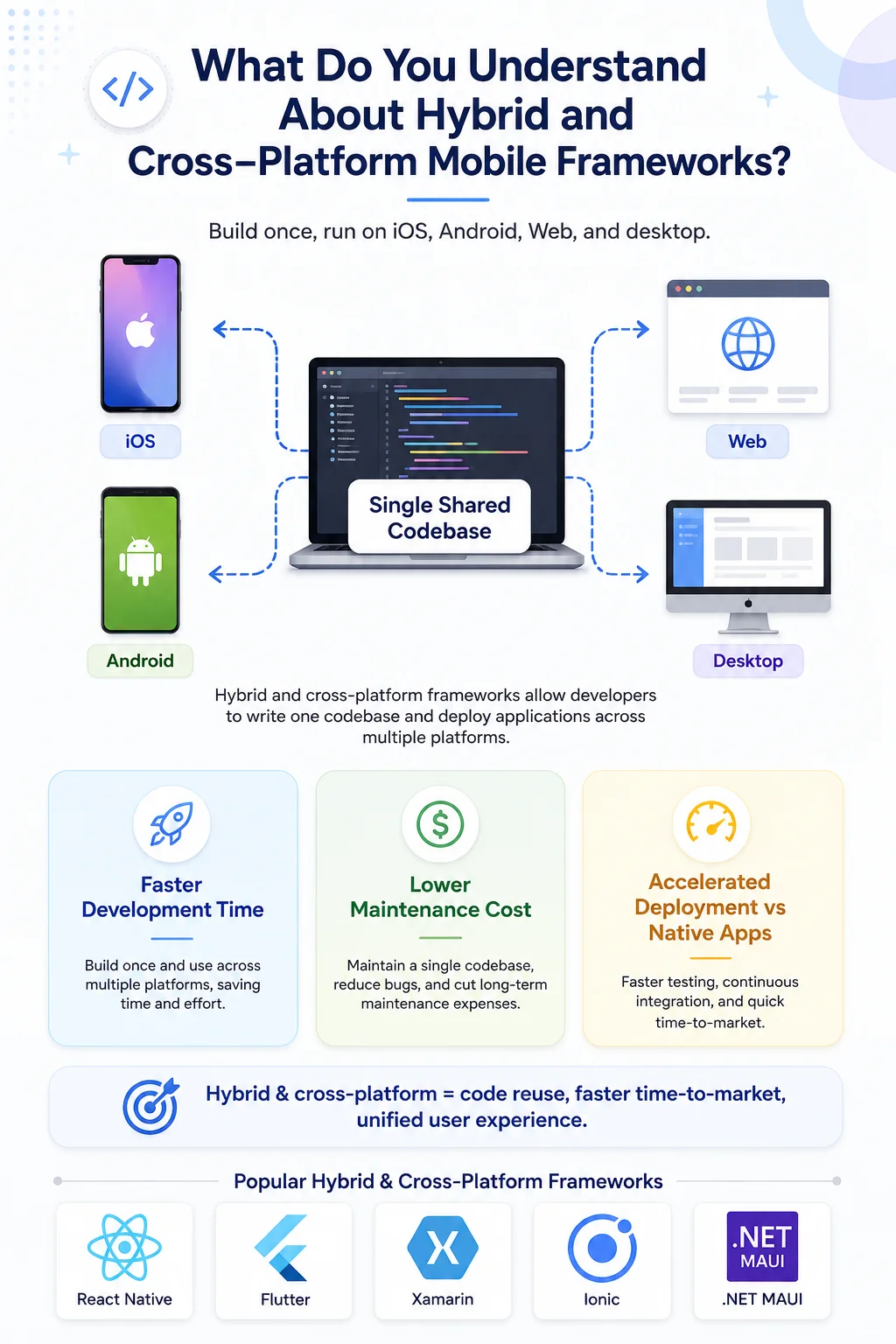
Hybrid and cross–platform mobile frameworks allow developers to build applications for mobile platforms such as — iOS, Android, Web, and even desktop — with a single shared codebase. In a practical sense, it can reduce the development time, lower the ongoing maintenance costs, and speed up the release a bit more, compared to building separate native applications for each platform. It’s a streamlined path, however you still have to handle differences, but overall the workflow feels more efficient, and less expensive. Some of the examples of such frameworks include:
React Native
Flutter
.NET MAUI
Ionic
Apache Cordova
Among these, React Native, and Flutter are the most widely adopted according to developer surveys. While the other frameworks keep showing up for more specialized enterprise and web–based application needs. Every framework seems different in architecture, programming language, rendering approach, performance, ecosystem maturity, and also with plugin support, so it really comes down to what you want to build, and how rigid you are about constraints.
Adoption, Benchmarks, and Surveys
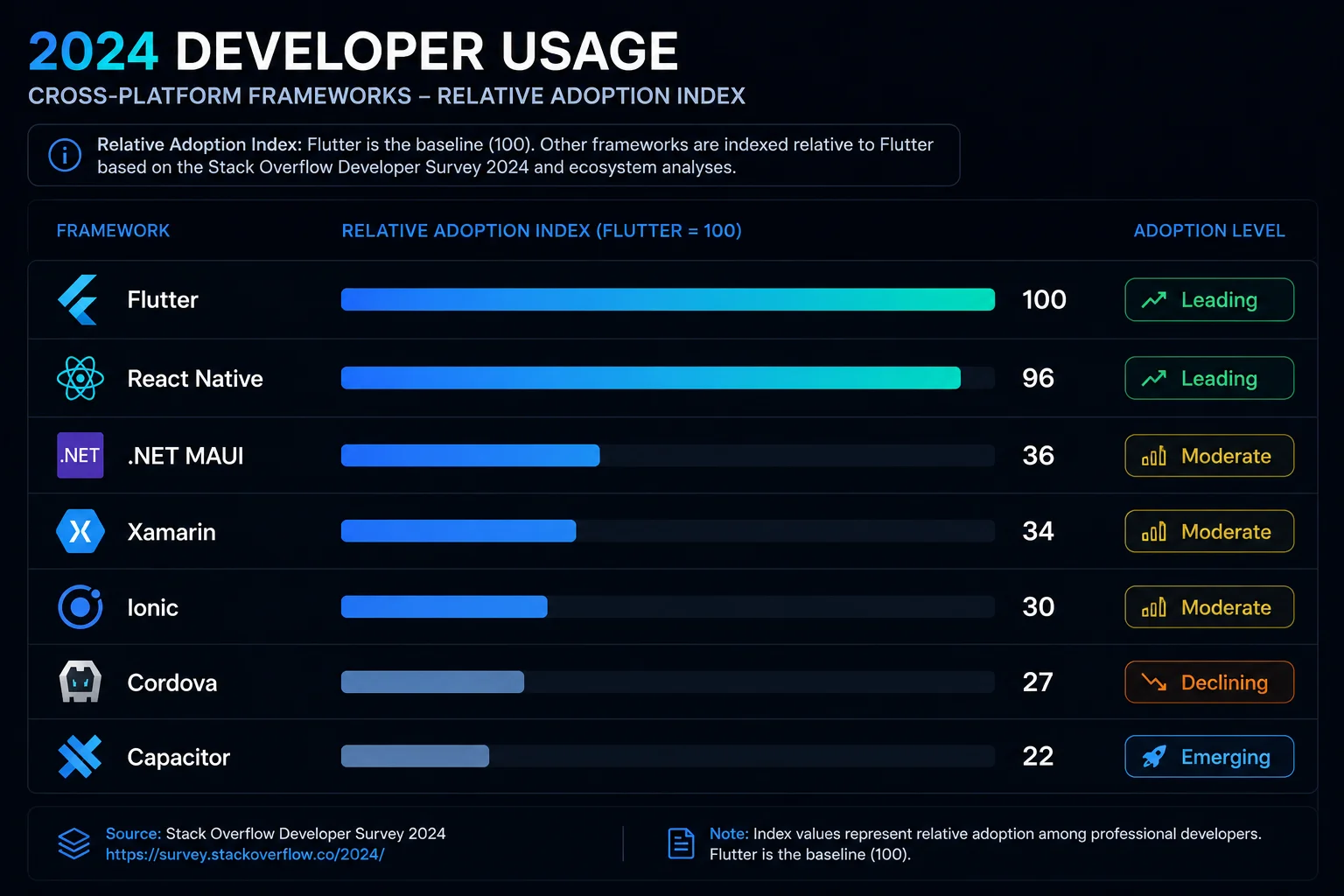
When you look at what developers really end up using today, you keep seeing Flutter and React Native consistently come out on top. The 2024 Stack Overflow Developer Survey backs that up too — Flutter inched ahead with professional developers, while React Native stayed right behind it. Alongside them you also get other frameworks such as .NET MAUI, Xamarin, Cordova, and Capacitor floating around, but their communities have noticeably smaller followings. JetBrains ran their own survey in 2023 and landed at the same conclusion — when developers need to ship across platforms, most of them reach for one of these two.
Performance benchmarks reveal important differences between frameworks. Ionic and React Native showed similar startup times and smooth rendering performance in benchmark tests. However, Ionic consumed significantly less CPU power because it uses modern WebView technology. Frameworks like Flutter and Xamarin generally provide the best raw performance because they compile closer to native code, while web–based frameworks such as Ionic, Onsen UI, and Framework7 prioritize faster development and easier web integration over maximum performance.
Read Also: How AI Agents Are Replacing Traditional SaaS Tools in 2026
Top 10 Frameworks for Hybrid Mobile Apps
1. React Native
Meta / Facebook · MIT · 2015
React Native fundamentally runs JavaScript inside a JS engine and then bridges that out to the real, platform–native UI widget, like UIKit on iOS, Android views on Android. The result looks and feels native, even though you’re not writing directly in those UI toolkits, because underneath it is native for real. And with the newer Fabric plus TurboModules setup, the older async bridge is swapped out, with a synchronous C++ renderer. That tends to cut render latency, pretty noticeably, in practice.
Best for: Teams already using React; consumer apps needing a huge plugin ecosystem; projects targeting iOS + Android + Web from one repo.
Case Study — Shopify
Shopify migrated every one of its mobile apps — used by millions of merchants worldwide — to React Native. A single codebase now ships features simultaneously to iOS and Android, dramatically cutting the time between development and release.
"All mobile apps at Shopify are built using React Native."
2. Flutter
Google · BSD · 2017
Flutter comes with a pretty different mindset — it doesn’t really depend on native UI widget at all. The Dart code compiles ahead of time into native ARM machine code, and then Flutter’s custom drawing engine (these days called Impeller) draws basically every pixel itself, so you get a kind of pixel-perfect control, plus smoother than expected motion, and yes, often the 60 FPS+ feel stays steady across different platforms, even if everything looks a little too perfect at times.
Best for: Visually rich, animated apps; teams willing to learn Dart; projects needing true desktop + mobile + web parity.
Case Study — Google Ads & Earth
Google uses Flutter on its own production apps — including Google Ads, Google Earth, Google Pay, and YouTube Create. These high–traffic, performance–critical apps demonstrate Flutter's ability to handle real–world scale without compromise.
Talabat: "Transitioning to Flutter resulted in faster releases and a more stable experience for millions of users."
3. Xamarin
Microsoft (now succeeded by .NET MAUI) · MIT · 2011
Xamarin brought C# to mobile by compiling IL code to native ARM via the Mono runtime. Xamarin.Forms added a shared XAML UI layer on top. Microsoft ended mainstream support for Xamarin in May 2024 and replaced it with .NET MAUI — but the architecture concepts live on. Still relevant for teams maintaining older codebases.
Best for: Legacy .NET enterprise apps; teams with deep C# expertise.
4. .NET MAUI
Microsoft · MIT · 2022
MAUI — Multi–platform App UI — is Microsoft's "one .NET" answer to Flutter and React Native. A single C# project targets Android, iOS, Windows, and macOS simultaneously, mapping a unified control API to each platform's native widgets. Blazor Hybrid support lets you embed web UI inside a native shell.
Best for: Enterprise teams in the Microsoft ecosystem; apps that also need a native Windows desktop version.
5. Ionic
Ionic Team · MIT · 2013
Ionic is essentially your web app — running in a full–screen WebView — dressed in a library of mobile–optimized UI components that automatically adapt to iOS or Android styling. The modern capacitor bridge replaces old Cordova for native APIs. Because it runs in the device's browser engine (WKWebView/Chrome), JIT compilation is available, which gives Ionic apps surprisingly low CPU usage compared to React Native's JS engine in benchmarks.
Best for: Web developer teams; content–heavy or form–driven apps; PWA + mobile from one codebase.
Case Study — MarketWatch
Dow Jones rebuilt the MarketWatch financial news app with Ionic. The team chose it for developer efficiency and the quality of its transitions. The result met both the performance bar and the tight deadline a major news property requires.
"Ionic provides a faster experience than our previous apps, and the transitions are elegant."
6. Apache Cordova
Apache Foundation (ex-PhoneGap) · Apache 2.0 · 2011
Cordova is the pioneering framework for hybrid mobile development. It wraps a WebView and then it exposes device APIs, like camera , GPS, contacts, using a JavaScript bridge. It actually powered a whole generation of apps from 2011–2018 and it was basically the engine under Ionic too, for a while. Nowadays most new projects go with Capacitor, which is Ionic’s spiritual successor to Cordova, but there are still thousands of live apps running on Cordova right now.
Best for: Maintaining legacy hybrid apps; very fast, low–stakes web–to–app conversions.
7. NativeScript
Progress / Telerik · Apache 2.0 · 2015
NativeScript is React Native's close cousin philosophically. JavaScript runs natively, rendering real native UI widgets with zero WebView involvement. Its most compelling feature is 100% direct access to iOS and Android APIs from JavaScript — no plugin needed. You can call any native SDK method directly from JS, which is powerful for advanced integrations.
Best for: JavaScript teams who need deep native API access without writing Swift or Kotlin; Angular/Vue shops targeting mobile.
8. Onsen UI
Asial / Monaca · Apache 2.0 · 2013
Onsen UI is a framework–agnostic UI component library for hybrid apps. Built on Web Components, it pairs naturally with Cordova (or Monaca) and automatically renders components in either iOS or Material Design style based on the device. It works with vanilla JS or with Angular/React/Vue bindings — no framework lock–in.
Best for: Teams wanting fast, native–look UIs without being tied to a specific JS framework; Japanese market apps (popular with Monaco).
9. Framework7
Vladimir Kharlampidi · MIT · Community
Framework7 is the simplest way to build something that looks very much like a native iOS or Android app, with standard web technologies. It comes with a comprehensive component set, things like modals, tabs, lists, and navigation, plus pixel perfect iOS and Material themes, so the feel is kept. Also it’s flexible, it runs with Vue React Svelte, or even vanilla HTML, without any problem.
Best for: Rapid prototyping; small teams needing a polished app without complex setup; Electron desktop apps with native–mobile aesthetics.
10. Titanium SDK
Appcelerator → Axway → TiDev · Apache 2.0 · 2008
Titanium was the first serious "JavaScript → native UI" framework, predating React Native by seven years. It compiles JavaScript to native bindings (no WebView), giving true native performance. Once it had nearly 950,000 registered developers and was reportedly installed on 10% of all smartphones. Today it's maintained by the non–profit TiDev and largely legacy.
Best for: Maintaining existing Titanium apps; niche cases where a JS–to–native bridge with 15+ years of history matters.
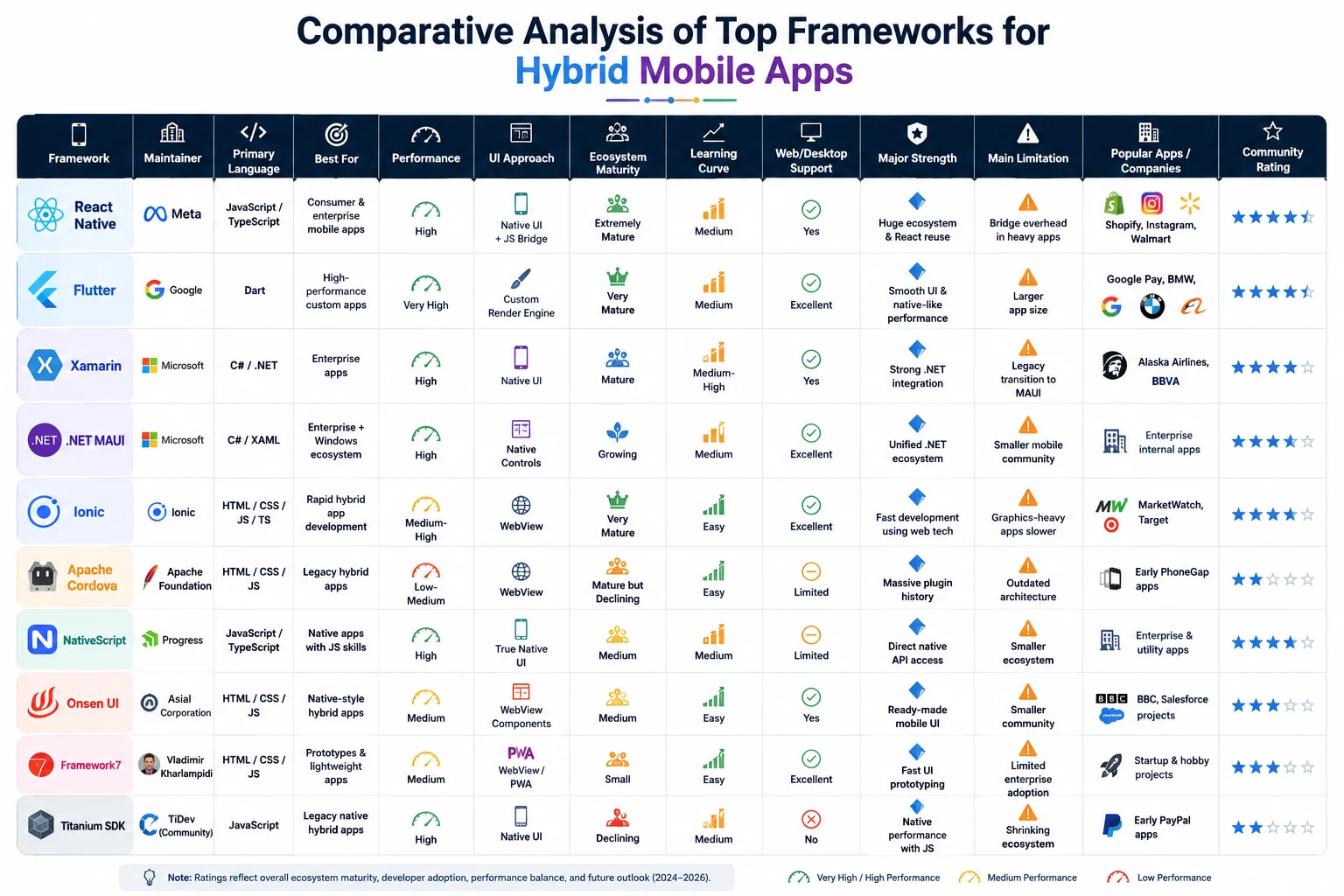
How to Choose the Best Framework for Hybrid Mobile Apps
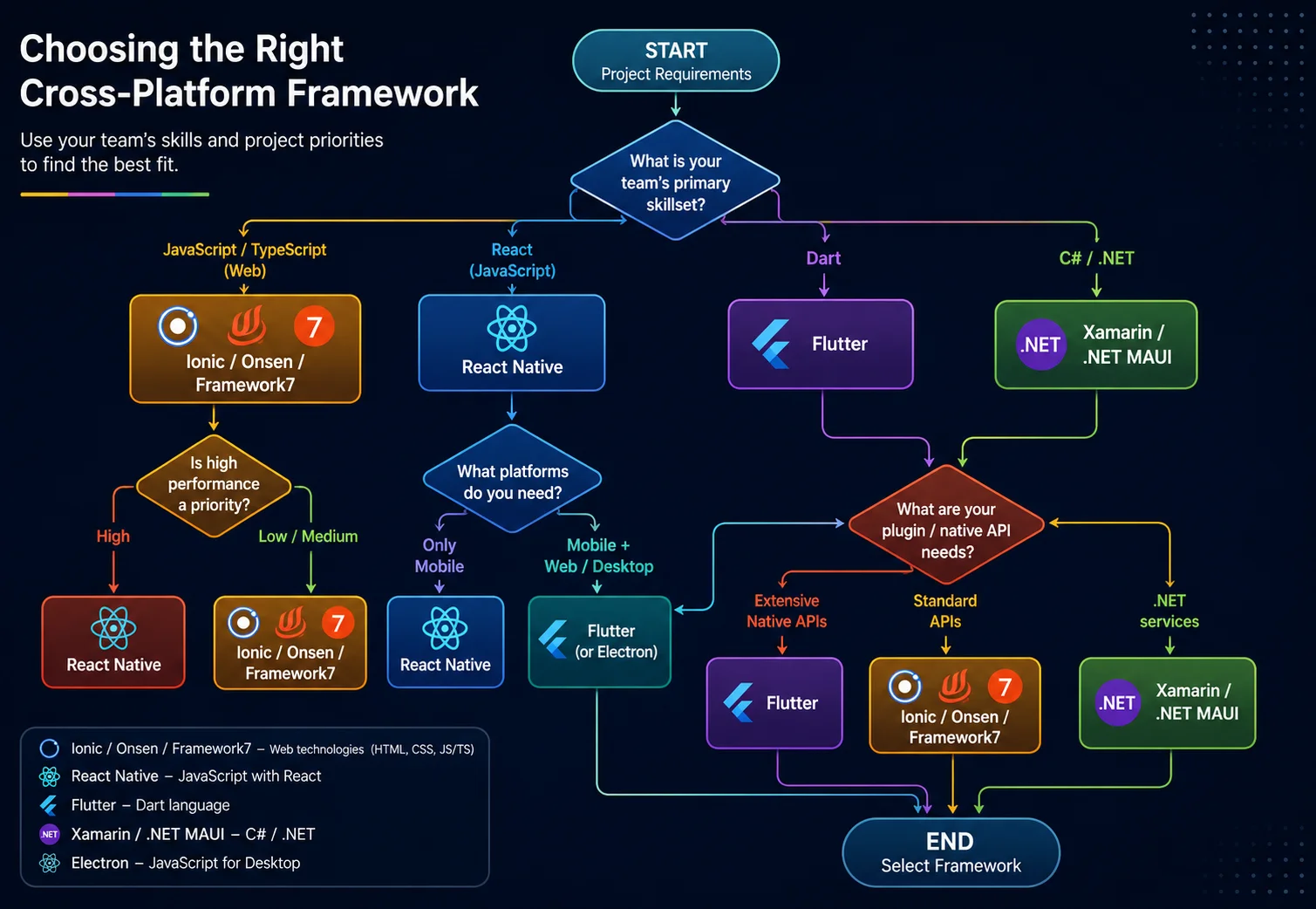
Team skillset
Use what your team knows. Web/JavaScript developers excel with Ionic, Onsen UI, or Framework7. If your team knows React, React Native is natural. C#/.NET teams should lean to Xamarin/.NET MAUI. If starting fresh and willing to learn Dart, Flutter is a strong choice.
Maximum Performance
Need 60fps animations, complex graphics, or game–like UI? Flutter's AOT–compiled custom renderer has no equal among hybrid options. For graphically intensive or animation-heavy apps, prefer Flutter or Xamarin/MAUI (compiled native). React Native is also quite fast for typical UIs. Ionic/Onsen (WebView‑based) may struggle with complex graphics but works well for form-driven or content apps. Measure early with prototypes if performance is critical.
Web Team Going Mobile
Your team lives in HTML/CSS/JS and needs mobile output without learning a new language. Ionic with Capacitor is the most direct path.
React Developers
If your team already knows React, React Native's component model, hooks, and JSX feel like home — plus an enormous ecosystem of libraries.
Enterprise/.NET Shop
C#, Azure, Visual Studio, and Windows deployment requirements all point in one direction. MAUI is Microsoft's unified cross–platform answer.
Deep Native API Access
Need to call obscure iOS/Android SDKs directly from JavaScript without writing a plugin? NativeScript exposes 100% of native APIs to JS by design.
Faster Prototype
Building a quick demo or proof–of–concept? Framework7's zero–config HTML/CSS setup gets you a pixel–perfect looking app in an afternoon.
Time-to-market
Hybrid frameworks (React Native, Ionic) often yield faster development (especially with one person targeting two platforms). Flutter’s single codebase also speeds up release. Native stacks (Swift/ObjC, Kotlin/Java) are slower if you need both iOS and Android.
Plugin and ecosystem
Check if needed native features are supported. React Native and Flutter have very mature plugin libraries. Ionic (via Cordova/Capacitor) covers most APIs but sometimes requires writing a custom plugin. Xamarin has Xamarin.Essentials and many NuGet packages. If a critical plugin is missing, it might sway your choice.
Maintenance and longevity
All above are active, but consider community and backing. Flutter, React Native, and Xamarin/MAUI have strong corporate support (Google, Meta, Microsoft). Ionic is backed by its company. Cordova is old, and Titanium is community‑run. Also consider how many active developers you can hire for each stack.
Final Note
The hybrid app landscape in 2026 has effectively settled into a two–tier structure. Flutter and React Native are the dominant tier — both backed by major tech companies, both with mature ecosystems, and both capable of production apps at scale. Every other framework occupies a specific niche:.NET MAUI for Microsoft–stack enterprises; Ionic for web developers who want PWA + mobile from one codebase; NativeScript for JavaScript teams who refuse to compromise on native API access.
That old “write once, run anywhere” dream is getting real more than ever. The main problem now isn’t really if hybrid frameworks can replace native. For most apps they can, but the actual question is which one fits your team, your timeline, and those users you’re trying to serve. Pick the framework based on your team’s skillset first, think about performance constraints second, then look at how mature the ecosystem is third, and honestly you’ll almost never land on the wrong choice.

Priyank Jha
Priyank is a Senior Content Developer and Strategist at SNVA Veranda. Earlier, he worked as a data scientist, where he gained extensive experience in developing data-driven solutions, advanced analytics, and strategic decision-making processes. His expertise includes data analysis, business intelligence, and implementing data-centric strategies that drive organizational growth and innovation. In addition to his data science experience, Priyank has over 10 years of experience in the banking and financial services sector. He has worked across various roles and operational levels, gaining in-depth knowledge of financial operations, customer service management, and business processes.
Learn how we research, review, and update our content. Editorial Standards & Review Process.

Latest Blogs
8 Why Your PMO Is Dying, and How PRINCE2 7 Could Save It
 Is PRINCE2 Certification Still Worth It in 2026? An Honest ROI Breakdown
 Top 20 Toughest Exams in the World 2026: Students Guide
 $100 Billion AI Automation Boom: Why Businesses Are Investing More in 2026
 CISSP vs. CISA: Which Cybersecurity Certification Controls Your Career?
 What is Continual Learning in AI and Machine Learning?
  What are the Major Benefits of Online DBA Programs?
 CMAT 2027: Exam Date, Syllabus, Exam Pattern, Preparation Tips & FAQs
Building two separate apps — one for iOS and one for Android — used to be the only serious option. That changed entirely with Hybrid Frameworks which now let a single team write one codebase and ship to both platforms (plus web and desktop in many cases) without sacrificing meaningful performance. This guide covers the top ten major players — their architecture, real–world use case, and when to pick which.
What Do You Understand About Hybrid and Cross–Platform Mobile Frameworks?
Hybrid and cross–platform mobile frameworks allow developers to build applications for mobile platforms such as — iOS, Android, Web, and even desktop — with a single shared codebase. In a practical sense, it can reduce the development time, lower the ongoing maintenance costs, and speed up the release a bit more, compared to building separate native applications for each platform. It’s a streamlined path, however you still have to handle differences, but overall the workflow feels more efficient, and less expensive. Some of the examples of such frameworks include:
React Native
Flutter
.NET MAUI
Ionic
Apache Cordova
Among these, React Native, and Flutter are the most widely adopted according to developer surveys. While the other frameworks keep showing up for more specialized enterprise and web–based application needs. Every framework seems different in architecture, programming language, rendering approach, performance, ecosystem maturity, and also with plugin support, so it really comes down to what you want to build, and how rigid you are about constraints.
Adoption, Benchmarks, and Surveys
When you look at what developers really end up using today, you keep seeing Flutter and React Native consistently come out on top. The 2024 Stack Overflow Developer Survey backs that up too — Flutter inched ahead with professional developers, while React Native stayed right behind it. Alongside them you also get other frameworks such as .NET MAUI, Xamarin, Cordova, and Capacitor floating around, but their communities have noticeably smaller followings. JetBrains ran their own survey in 2023 and landed at the same conclusion — when developers need to ship across platforms, most of them reach for one of these two.
Performance benchmarks reveal important differences between frameworks. Ionic and React Native showed similar startup times and smooth rendering performance in benchmark tests. However, Ionic consumed significantly less CPU power because it uses modern WebView technology. Frameworks like Flutter and Xamarin generally provide the best raw performance because they compile closer to native code, while web–based frameworks such as Ionic, Onsen UI, and Framework7 prioritize faster development and easier web integration over maximum performance.
Read Also: How AI Agents Are Replacing Traditional SaaS Tools in 2026
Top 10 Frameworks for Hybrid Mobile Apps
1. React Native
Meta / Facebook · MIT · 2015
React Native fundamentally runs JavaScript inside a JS engine and then bridges that out to the real, platform–native UI widget, like UIKit on iOS, Android views on Android. The result looks and feels native, even though you’re not writing directly in those UI toolkits, because underneath it is native for real. And with the newer Fabric plus TurboModules setup, the older async bridge is swapped out, with a synchronous C++ renderer. That tends to cut render latency, pretty noticeably, in practice.
Best for: Teams already using React; consumer apps needing a huge plugin ecosystem; projects targeting iOS + Android + Web from one repo.
Case Study — Shopify
Shopify migrated every one of its mobile apps — used by millions of merchants worldwide — to React Native. A single codebase now ships features simultaneously to iOS and Android, dramatically cutting the time between development and release.
"All mobile apps at Shopify are built using React Native."
2. Flutter
Google · BSD · 2017
Flutter comes with a pretty different mindset — it doesn’t really depend on native UI widget at all. The Dart code compiles ahead of time into native ARM machine code, and then Flutter’s custom drawing engine (these days called Impeller) draws basically every pixel itself, so you get a kind of pixel-perfect control, plus smoother than expected motion, and yes, often the 60 FPS+ feel stays steady across different platforms, even if everything looks a little too perfect at times.
Best for: Visually rich, animated apps; teams willing to learn Dart; projects needing true desktop + mobile + web parity.
Case Study — Google Ads & Earth
Google uses Flutter on its own production apps — including Google Ads, Google Earth, Google Pay, and YouTube Create. These high–traffic, performance–critical apps demonstrate Flutter's ability to handle real–world scale without compromise.
Talabat: "Transitioning to Flutter resulted in faster releases and a more stable experience for millions of users."
3. Xamarin
Microsoft (now succeeded by .NET MAUI) · MIT · 2011
Xamarin brought C# to mobile by compiling IL code to native ARM via the Mono runtime. Xamarin.Forms added a shared XAML UI layer on top. Microsoft ended mainstream support for Xamarin in May 2024 and replaced it with .NET MAUI — but the architecture concepts live on. Still relevant for teams maintaining older codebases.
Best for: Legacy .NET enterprise apps; teams with deep C# expertise.
4. .NET MAUI
Microsoft · MIT · 2022
MAUI — Multi–platform App UI — is Microsoft's "one .NET" answer to Flutter and React Native. A single C# project targets Android, iOS, Windows, and macOS simultaneously, mapping a unified control API to each platform's native widgets. Blazor Hybrid support lets you embed web UI inside a native shell.
Best for: Enterprise teams in the Microsoft ecosystem; apps that also need a native Windows desktop version.
5. Ionic
Ionic Team · MIT · 2013
Ionic is essentially your web app — running in a full–screen WebView — dressed in a library of mobile–optimized UI components that automatically adapt to iOS or Android styling. The modern capacitor bridge replaces old Cordova for native APIs. Because it runs in the device's browser engine (WKWebView/Chrome), JIT compilation is available, which gives Ionic apps surprisingly low CPU usage compared to React Native's JS engine in benchmarks.
Best for: Web developer teams; content–heavy or form–driven apps; PWA + mobile from one codebase.
Case Study — MarketWatch
Dow Jones rebuilt the MarketWatch financial news app with Ionic. The team chose it for developer efficiency and the quality of its transitions. The result met both the performance bar and the tight deadline a major news property requires.
"Ionic provides a faster experience than our previous apps, and the transitions are elegant."
6. Apache Cordova
Apache Foundation (ex-PhoneGap) · Apache 2.0 · 2011
Cordova is the pioneering framework for hybrid mobile development. It wraps a WebView and then it exposes device APIs, like camera , GPS, contacts, using a JavaScript bridge. It actually powered a whole generation of apps from 2011–2018 and it was basically the engine under Ionic too, for a while. Nowadays most new projects go with Capacitor, which is Ionic’s spiritual successor to Cordova, but there are still thousands of live apps running on Cordova right now.
Best for: Maintaining legacy hybrid apps; very fast, low–stakes web–to–app conversions.
7. NativeScript
Progress / Telerik · Apache 2.0 · 2015
NativeScript is React Native's close cousin philosophically. JavaScript runs natively, rendering real native UI widgets with zero WebView involvement. Its most compelling feature is 100% direct access to iOS and Android APIs from JavaScript — no plugin needed. You can call any native SDK method directly from JS, which is powerful for advanced integrations.
Best for: JavaScript teams who need deep native API access without writing Swift or Kotlin; Angular/Vue shops targeting mobile.
8. Onsen UI
Asial / Monaca · Apache 2.0 · 2013
Onsen UI is a framework–agnostic UI component library for hybrid apps. Built on Web Components, it pairs naturally with Cordova (or Monaca) and automatically renders components in either iOS or Material Design style based on the device. It works with vanilla JS or with Angular/React/Vue bindings — no framework lock–in.
Best for: Teams wanting fast, native–look UIs without being tied to a specific JS framework; Japanese market apps (popular with Monaco).
9. Framework7
Vladimir Kharlampidi · MIT · Community
Framework7 is the simplest way to build something that looks very much like a native iOS or Android app, with standard web technologies. It comes with a comprehensive component set, things like modals, tabs, lists, and navigation, plus pixel perfect iOS and Material themes, so the feel is kept. Also it’s flexible, it runs with Vue React Svelte, or even vanilla HTML, without any problem.
Best for: Rapid prototyping; small teams needing a polished app without complex setup; Electron desktop apps with native–mobile aesthetics.
10. Titanium SDK
Appcelerator → Axway → TiDev · Apache 2.0 · 2008
Titanium was the first serious "JavaScript → native UI" framework, predating React Native by seven years. It compiles JavaScript to native bindings (no WebView), giving true native performance. Once it had nearly 950,000 registered developers and was reportedly installed on 10% of all smartphones. Today it's maintained by the non–profit TiDev and largely legacy.
Best for: Maintaining existing Titanium apps; niche cases where a JS–to–native bridge with 15+ years of history matters.
How to Choose the Best Framework for Hybrid Mobile Apps
Team skillset
Use what your team knows. Web/JavaScript developers excel with Ionic, Onsen UI, or Framework7. If your team knows React, React Native is natural. C#/.NET teams should lean to Xamarin/.NET MAUI. If starting fresh and willing to learn Dart, Flutter is a strong choice.
Maximum Performance
Need 60fps animations, complex graphics, or game–like UI? Flutter's AOT–compiled custom renderer has no equal among hybrid options. For graphically intensive or animation-heavy apps, prefer Flutter or Xamarin/MAUI (compiled native). React Native is also quite fast for typical UIs. Ionic/Onsen (WebView‑based) may struggle with complex graphics but works well for form-driven or content apps. Measure early with prototypes if performance is critical.
Web Team Going Mobile
Your team lives in HTML/CSS/JS and needs mobile output without learning a new language. Ionic with Capacitor is the most direct path.
React Developers
If your team already knows React, React Native's component model, hooks, and JSX feel like home — plus an enormous ecosystem of libraries.
Enterprise/.NET Shop
C#, Azure, Visual Studio, and Windows deployment requirements all point in one direction. MAUI is Microsoft's unified cross–platform answer.
Deep Native API Access
Need to call obscure iOS/Android SDKs directly from JavaScript without writing a plugin? NativeScript exposes 100% of native APIs to JS by design.
Faster Prototype
Building a quick demo or proof–of–concept? Framework7's zero–config HTML/CSS setup gets you a pixel–perfect looking app in an afternoon.
Time-to-market
Hybrid frameworks (React Native, Ionic) often yield faster development (especially with one person targeting two platforms). Flutter’s single codebase also speeds up release. Native stacks (Swift/ObjC, Kotlin/Java) are slower if you need both iOS and Android.
Plugin and ecosystem
Check if needed native features are supported. React Native and Flutter have very mature plugin libraries. Ionic (via Cordova/Capacitor) covers most APIs but sometimes requires writing a custom plugin. Xamarin has Xamarin.Essentials and many NuGet packages. If a critical plugin is missing, it might sway your choice.
Maintenance and longevity
All above are active, but consider community and backing. Flutter, React Native, and Xamarin/MAUI have strong corporate support (Google, Meta, Microsoft). Ionic is backed by its company. Cordova is old, and Titanium is community‑run. Also consider how many active developers you can hire for each stack.
Final Note
The hybrid app landscape in 2026 has effectively settled into a two–tier structure. Flutter and React Native are the dominant tier — both backed by major tech companies, both with mature ecosystems, and both capable of production apps at scale. Every other framework occupies a specific niche:.NET MAUI for Microsoft–stack enterprises; Ionic for web developers who want PWA + mobile from one codebase; NativeScript for JavaScript teams who refuse to compromise on native API access.
That old “write once, run anywhere” dream is getting real more than ever. The main problem now isn’t really if hybrid frameworks can replace native. For most apps they can, but the actual question is which one fits your team, your timeline, and those users you’re trying to serve. Pick the framework based on your team’s skillset first, think about performance constraints second, then look at how mature the ecosystem is third, and honestly you’ll almost never land on the wrong choice.
Latest Blogs
8- Why Your PMO Is Dying, and How PRINCE2 7 Could Save It
- Is PRINCE2 Certification Still Worth It in 2026? An Honest ROI Breakdown
- Top 20 Toughest Exams in the World 2026: Students Guide
- $100 Billion AI Automation Boom: Why Businesses Are Investing More in 2026
- CISSP vs. CISA: Which Cybersecurity Certification Controls Your Career?
- What is Continual Learning in AI and Machine Learning?
- What are the Major Benefits of Online DBA Programs?
- CMAT 2027: Exam Date, Syllabus, Exam Pattern, Preparation Tips & FAQs
Priyank Jha
Priyank is a Senior Content Developer and Strategist at SNVA Veranda. Earlier, he worked as a data scientist, where he gained extensive experience in developing data-driven solutions, advanced analytics, and strategic decision-making processes. His expertise includes data analysis, business intelligence, and implementing data-centric strategies that drive organizational growth and innovation. In addition to his data science experience, Priyank has over 10 years of experience in the banking and financial services sector. He has worked across various roles and operational levels, gaining in-depth knowledge of financial operations, customer service management, and business processes.
Learn how we research, review, and update our content. Editorial Standards & Review Process.