


Programming languages such as Python, C++, JavaScript, and Java allow developers to write software using human-readable instructions. However, computers do not understand these languages directly. A processor only understands low-level machine instructions represented internally as binary values made of 0s and 1s.
This creates a major communication gap between humans and machines. To solve this problem, computer systems use language translators.
These translators convert human-readable source code into machine-understandable instructions so the processor can execute the program correctly. The two most important language translators are:
Translator Type | Working Method |
Compiler | Translates the complete program before execution |
Interpreter | Translates and executes one instruction at a time during runtime |
Both approaches solve communication problems between humans and machines, but each serves different software requirements.
By the end of this guide, you'll learn the main difference between a compiler and an interpreter, how compilers and interpreters work internally, how they execute programs differently, why programming languages use them, and how they impact software performance, debugging, portability, and modern application development.
Compiler vs Interpreter: Quick Comparison
Dimension | Compiler | Interpreter |
Translation timing | Translates the entire source code before the program runs. One-time cost paid at build time. Compiler advantage: GCC compiling a 1,000-line C file takes ~50 mspaid once, runs forever. | Translates and executes code line by line at runtime. Every run re-reads the source. Interpreter advantage in prototyping: Python re-parses and interprets every time you run the script, no build step needed. |
Execution speed | Runs as native machine code, with no translation overhead at runtime. Consistently the fastest execution model. Compiler wins decisively: C and C++ run 10–80× faster than Python on compute tasks (Benchmarks Game, 2023). | Must interpret each instruction live adds latency to every single operation. Slower at runtime: CPython (Python's default interpreter) executes ~1–10 million operations/sec vs compiled C's 100–1,000 million. |
Startup time | After compilation, startup is instant; the binary loads and executes in milliseconds. Compiler wins: A Go HTTP server binary starts in under 10ms. No parsing, no loading straight to execution. | The script runs immediately, no compile wait. Start-up experience feels instant for small scripts. Interpreter wins for quick runs: Python hello-world runs in ~30ms from terminal, no build step, but includes parse+interpret overhead. |
Error detection | Catches syntax, type, and scope errors before any code runs. The entire program is analyzed upfront. Compiler wins for large systems: Static analysis at compile time eliminates ~40% of common bugs before deployment. | Errors surface only when that specific line is reached at runtime; a bug in an untested path can hide for months. Risk: silent runtime failures: A Python TypeError inside an "if False" branch won't be caught until that branch actually runs in production. |
Code changes | Every change needs a recompile before you can test. Large projects make this painful. Interpreter wins for iteration: Full Chromium recompile: 2–8 hours. Incremental builds: 30–120 seconds. Still a cost on every change. | Change the file, and run immediately. The feedback loop is as fast as saving the file. Interpreter wins clearly: Flask/Django hot-reload reflects Python code changes in under 1 second, critical for rapid development. |
Portability | Compiled binary is platform-specific, and an x86 Linux binary cannot run on ARM macOS without recompiling. Interpreter wins on portability: 60%+ of GitHub CI pipelines now build for 2+ architectures to cope with platform fragmentation (2023). | Source code runs anywhere the interpreter is installed, one script, on every platform. Interpreter wins: Python scripts run unchanged on Windows, Linux, and macOS. The interpreter handles all platform differences. |
Source code protection | Distributes compiled binary; source logic is hidden. Critical for commercial software. Compiler wins: Microsoft Office, Adobe Photoshop, and most game engines distribute compiled binaries; the source never leaves the company. | Distributes source code directly (or lightly obfuscated). Trivially readable by anyone. Major IP risk: Python .pyc bytecode can be decompiled back to near-original source using tools like uncompyle6 in minutes. |
Memory usage | Lean runtime footprint, no interpreter engine loaded in memory. Efficient for resource-constrained systems. Compiler wins: Embedded IoT devices with 64–256 KB RAM can run compiled C. Python's interpreter alone needs ~5–15 MB. | The interpreter engine itself occupies memory in addition to the program's data. Higher baseline memory: CPython interpreter base memory: ~5–15 MB before your script adds a single variable. |
Optimization capability | Applies 100+ transformation passes over the full program, sees the whole picture to optimize globally. Compiler wins significantly: LLVM's optimizer can reduce instruction count by 30–60%. Vectorization alone delivers 2–8× speedups on loop-heavy code. | Can only optimize line-by-line, or small windows of code, no global view of the full program. Limited optimization scope: PyPy (a JIT-enhanced Python interpreter) reaches ~5× CPython speed, still far short of compiled C's 10–80×. |
Debugging experience | Harder to debug optimized code may reorder or remove variables, making stack traces misleading. Interpreter wins for debugging: Compiling with -O3 in GCC can inline, vectorize, and eliminate variables, breaking standard debugger line-tracking. | Line-by-line execution maps directly to source code debuggers, which can step through exactly as written. Interpreter wins clearly: Python's pdb and VS Code Python debugger step through source 1:1, what you see is exactly what runs. |
Best use case | Operating systems, game engines, embedded firmware, trading systems, browsers, anything where raw speed and resource efficiency matter most. Production-critical systems: Linux kernel, Chromium, Unreal Engine, and AWS's core hypervisor are all compiled in C/C++. | Data science, scripting, automation, rapid prototyping, education anywhere, developer speed matters more than runtime speed. Agile development contexts: Python powers ~80% of data science workflows (Kaggle 2023 survey), speed-to-insight beats raw performance. |
Examples | C, C++, Rust, Go, Swift, Fortran Compiled languages: Rust: #1 most-loved language 9 years running (Stack Overflow 2023). Used in Linux kernel, Windows, and Firefox. | Python, Ruby, JavaScript (in basic mode), PHP, Bash Interpreted languages: Python: #1 most popular language (TIOBE Oct 2024). Used by NASA, Instagram, and Spotify for rapid development. |
What is a Compiler?
A compiler is a software tool that translates an entire source program into machine code in a single pass before execution begins. The machine code becomes an executable file that the operating system can run directly.
Programming languages such as C, C++, Rust, Go, and Swift rely heavily on compilers for performance-focused applications.
Industry Fact: Over 70% of the world's critical infrastructure, including operating systems and financial trading engines, runs on compiled languages. The Linux kernel (30 million lines of C) is compiled once and executed billions of times daily.
Compiler: Pros & Cons
Compiler Aspect | Advantages | Disadvantages |
CPU Execution | Compiled code runs directly on processor instructions without runtime translation. This allows languages like C and C++ to power operating systems, browsers, and database engines. | The compiler must generate machine-specific instructions for each processor architecture, such as x86 or ARM, which reduces cross-platform compatibility. |
Runtime Speed | Compiled applications execute much faster in CPU-intensive workloads because translation is already finished before execution. | Faster runtime performance comes with slower development iteration because every source change requires recompilation. |
Optimization Capability | Modern compilers like LLVM and GCC perform advanced optimizations such as loop unrolling, dead code elimination, constant folding, and register allocation automatically. | Aggressive optimization may increase binary size and make debugging difficult because optimized machine code no longer closely matches the source code. |
Memory Efficiency | Compiled languages give low-level memory control, which helps reduce runtime overhead in embedded systems and high-performance applications. | Languages like C and C++ may expose developers to memory leaks, dangling pointers, and buffer overflow vulnerabilities if memory handling fails. |
Startup Performance | Compiled binaries launch immediately because no interpreter or virtual machine translation occurs during startup. | Large enterprise software can require long compilation pipelines before deployment, particularly in multi-module projects. |
Static Error Detection | Compilers catch syntax errors, undeclared variables, incompatible data types, and many structural issues before execution begins. | Compilers cannot detect all runtime problems, such as invalid user input, logical flaws, or hardware-related failures. |
Binary Distribution | Software companies can distribute executable binaries without exposing raw source code. | Separate binaries must be maintained for Windows, Linux, macOS, ARM devices, and other environments. |
Hardware Optimization | Compilers optimize instruction sets for specific CPUs using SIMD instructions, cache-aware memory layouts, and processor-specific tuning. | Processor-specific optimization reduces portability because optimized binaries may fail or lose performance on different hardware. |
Enterprise Software Development | Large systems such as PostgreSQL, Unreal Engine, and the Linux kernel rely on compiled languages for stability and high throughput. | Large compiled projects may require advanced build systems such as CMake, Bazel, or Ninja, which increases development complexity. |
Resource Usage During Execution | Compiled applications generally consume less runtime CPU usage because no line-by-line translation occurs during execution. | The compilation stage itself can consume substantial RAM and processing power, particularly in massive C++ projects. |
Security | Machine code binaries are harder to read and modify compared to interpreted source code. | Reverse engineering tools such as disassemblers and decompilers can still analyze compiled binaries. |
Dependency Management | Static linking can bundle required libraries directly into the executable, reducing runtime dependency issues. | Static linking increases executable size and may duplicate libraries across multiple applications. |
How Compilers Work?
We can say a compiler is like a master translator between two completely different worlds: the world of human-readable code and the world of machine instructions your CPU can actually run. You write something like x = 5+3, and the compiler turns it into thousands of ones and zeroes that the processor understands. This journey happens in 6-clearly defined stages.
For example, consider you're sending a recipe written in English to a factory in Japan. First, someone reads the words (lexical). Then checks grammar (syntax). Then confirms the ingredients make sense (semantic). Then figures out the most efficient production order (optimization). Then, writes factory machine instructions (code generation). Finally, the factory assembles everything together (linking). The compiled recipe runs perfectly at full factory speed every single time.
Compiler’s Workflow
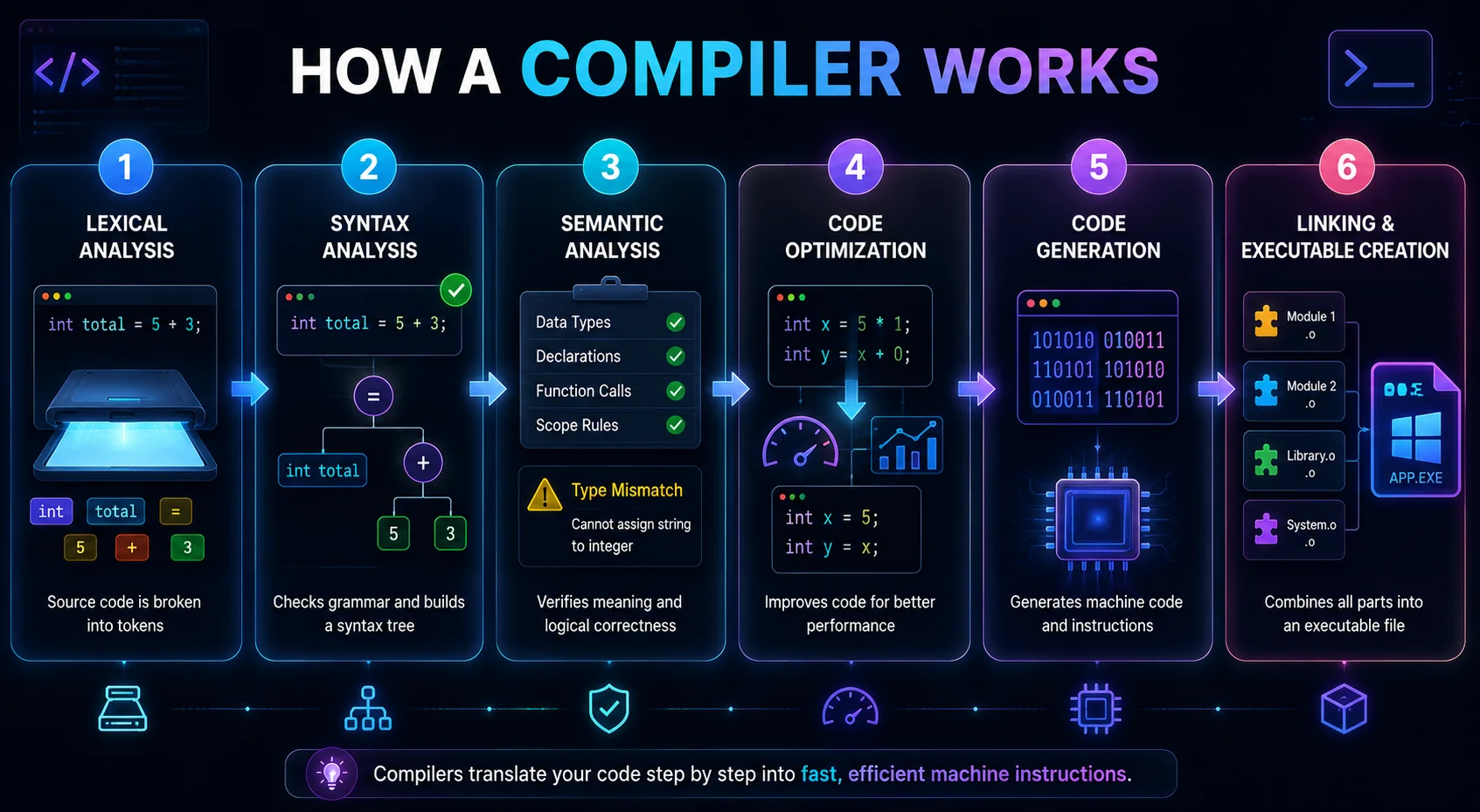
Stage 1: Lexical Analysis (Scanning)
The first stage is called "Lexical Analysis." Here, the compiler reads the source code character by character and breaks it into smaller units called tokens. The lexical analyzer acts like a scanner in a supermarket. It identifies each item before processing begins.
Code Part | Token Type |
int | Keyword |
total | Identifier |
= | Operator |
5 | Number |
+ | Operator |
3 | Number |
Step 2: Syntax Analysis (Parsing)
After tokenization, the compiler checks whether the code follows the grammar rules of the programming language. The compiler checks statement structure, brackets, semicolons, and operator placement.
The compiler builds a structure called a parse tree or syntax tree.
Stage 3: Semantic Analysis
Now the compiler checks whether the code makes logical sense. Even if the syntax is correct, the program may still contain meaning-related problems. The syntax in this stage is valid, but assigning text to an integer variable creates a semantic error. The compiler verifies:
Data types
Variable declarations
Function calls
Scope rules
If the function requires two values, semantic analysis reports an error. This stage acts like a quality inspector checking whether recipe ingredients actually fit together.
Step 4: Code Optimization
Once the compiler confirms the code is valid, it improves the code for better performance. The compiler attempts to:
Reduce execution time
Lower memory usage
Remove unnecessary instructions
The compiler directly stores the final result instead of performing multiplication every time.
Stage 5: Code Generation
After optimization, the compiler generates machine-level instructions. This stage converts the program into:
Assembly language
Object code
Machine instructions
This stage acts like translating English instructions into robotic machine commands inside a factory.
Stage 6: Linking and Executable Creation
The final stage combines all program parts together. Large programs use multiple source files, external libraries, and system functions. The linker connects everything into one executable file.
What is an Interpreter?
An interpreter is a program that reads, translates, and executes source code one statement at a time. We can say that an interpreter is a live translator during an international meeting. The speaker says one sentence, the translator converts it instantly, and the listener responds immediately before the next sentence begins.
Interesting Fact: More than 98% of websites worldwide use JavaScript, an interpreted language that runs directly inside web browsers. Modern browser engines, such as Google V8, can process millions of JavaScript instructions per second using Just-In-Time (JIT) interpretation techniques.
Interpreter: Pros & Cons
Aspect | Advantages of an Interpreter | Disadvantages of an Interpreter |
Execution Method | Executes code line by line, which allows immediate program execution. | Runtime translation slows execution because each instruction is processed repeatedly during every run. |
Debugging | Reports errors instantly at the exact line where execution fails, making debugging easier. | Execution stops immediately after encountering a runtime error, even if the remaining code is correct. |
Development Speed | Developers can test and modify code quickly without recompilation. | Frequent runtime checks may reduce performance during large-scale execution. |
Compilation Requirement | Does not require a separate compilation stage before execution begins. | The interpreter itself must remain active during the entire execution process. |
Portability | Source code can run across multiple platforms if the interpreter exists for that system. | Different interpreter versions may create compatibility problems between environments. |
Performance | Suitable for scripting, automation, and rapid application development. | Interpreted programs execute more slowly than compiled programs due to runtime translation overhead. |
Resource Usage | Small scripts can execute with minimal setup and configuration. | Continuous parsing and execution may increase CPU and memory consumption. |
Source Code Accessibility | Developers can directly edit and execute source files during runtime. | Source code must be distributed with the application, which increases code exposure risks. |
Runtime Flexibility | Supports interactive shells, dynamic typing, and live code execution. | Dynamic runtime behavior may introduce unpredictable runtime errors. |
Application Suitability | Highly useful for web scripting, machine learning, automation, and testing environments. | Not ideal for highly performance-intensive systems such as operating systems or game engines. |
Learning Curve | Immediate feedback helps beginners understand programming concepts faster. | Runtime errors may confuse beginners because some problems only appear during execution. |
Optimization | Simplifies rapid prototyping and iterative development workflows. | Runtime optimization capabilities remain lower compared to advanced compiler optimization systems. |
How Interpreters Work?
An interpreter acts as a runtime execution system between high-level source code and machine-level processor instructions. Unlike a compiler, an interpreter does not translate the complete program into a standalone executable file before execution begins.
For example, consider a multinational business meeting where executives from different countries communicate through a live translator. The speaker delivers one sentence in English. The translator immediately converts the sentence into Japanese, and the listener responds before the next sentence begins.
The translator does not wait for the complete meeting transcript before starting translation. The process follows this sequence:
1. Listen to one sentence
2. Translate instantly
3. Deliver the translated instruction
4. Move to the next sentence
Interpreter's Workflow
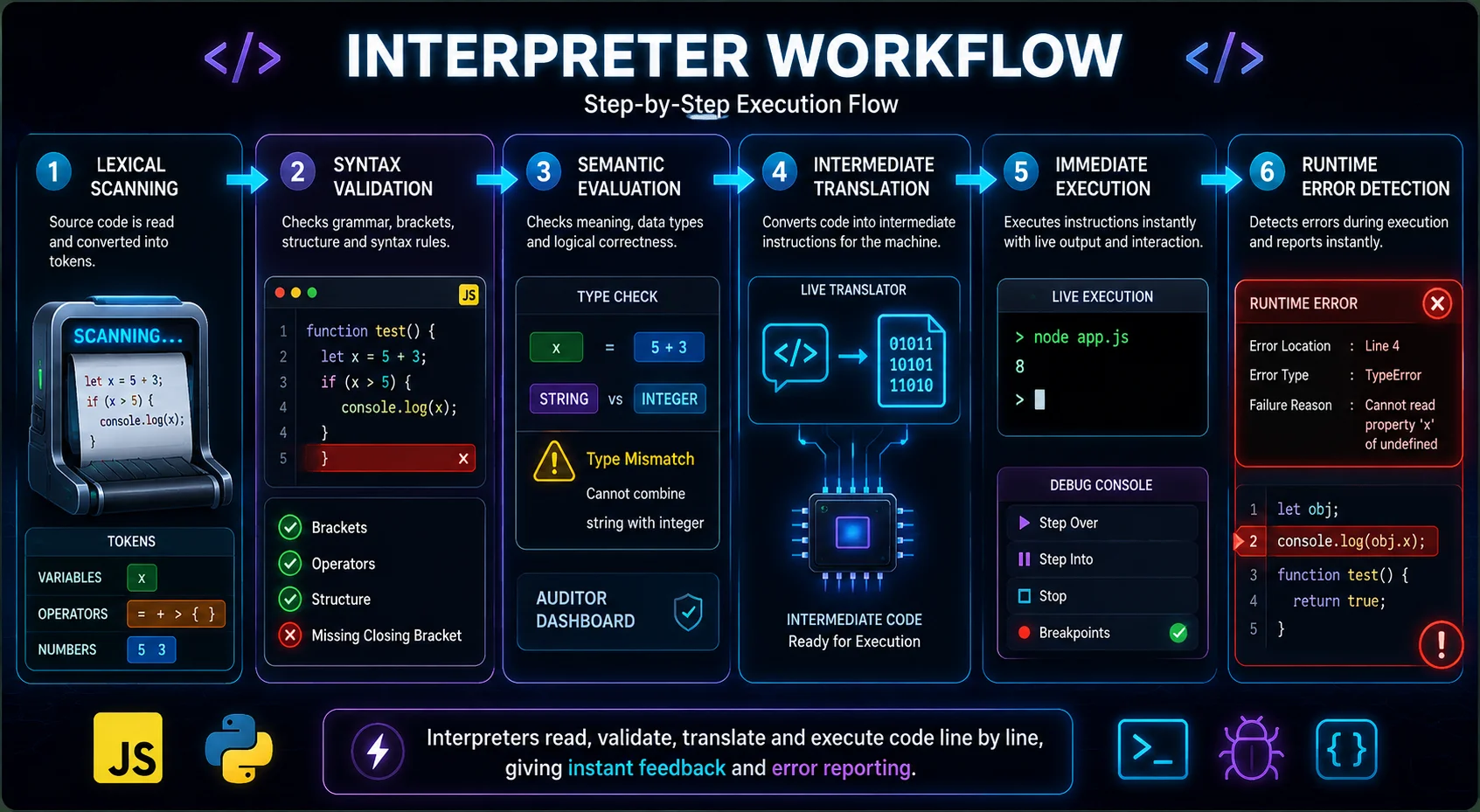
Step 1: Lexical Scanning
The interpreter reads the source code character by character and converts it into manageable language units called tokens. This stage functions similarly to a document scanner inside an airport security system. The scanner identifies each item before processing begins.
Step 2: Syntax Validation
After tokenization, the interpreter checks whether the statement follows the grammar rules of the language. The interpreter validates statement structure, parentheses, operator placement, block formatting, and function structure.
Web applications written in JavaScript contain thousands of event-driven functions. Browser interpreters continuously validate syntax before executing dynamic webpage operations. Even a missing bracket can stop JavaScript execution for part of the webpage.
Step 3: Semantic Evaluation
Once syntax validation succeeds, the interpreter checks whether the instruction is logically valid. The syntax is valid, but combining a string and an integer may create a runtime type error depending on the language's behavior. This stage resembles a financial auditor verifying whether transaction values and account balances logically match before processing payments.
Step 4: Intermediate Translation
After validation, the interpreter converts the instruction into intermediate operations executable by the processor or virtual machine. This stage resembles a live translator converting spoken instructions into operational commands during an active manufacturing process.
Step 5: Immediate Execution
After translation, the interpreter executes the instruction instantly. The interpreter executes instructions sequentially throughout runtime. This execution model enables:
Interactive shells
Live debugging
Dynamic scripting
Runtime testing
Cloud automation systems frequently use Python and shell interpreters for deployment pipelines.
Step 6: Runtime Error Detection
One major characteristic of interpreters is immediate runtime error reporting. The interpreter reports:
Exact error location
Error type
Execution failure reason
This immediate feedback simplifies debugging during development.
Conclusion
Compilers and interpreters are fundamental technologies that make modern programming possible. Both act as language translators that convert human-readable source code into machine-level instructions that computers can execute. However, they follow thoroughly different execution models.
Modern programming environments increasingly combine compilation and interpretation together using technologies such as bytecode execution and Just-In-Time (JIT) compilation. This hybrid approach improves both performance and portability in modern software systems.
Latest Blogs
8 Top 20 Toughest Exams in the World 2026: Students Guide
 $100 Billion AI Automation Boom: Why Businesses Are Investing More in 2026
 CISSP vs. CISA: Which Cybersecurity Certification Controls Your Career?
 What is Continual Learning in AI and Machine Learning?
  What are the Major Benefits of Online DBA Programs?
 CMAT 2027: Exam Date, Syllabus, Exam Pattern, Preparation Tips & FAQs
 Why Is Nursing in Demand in 2026? Trends Driving the Need for More Nurses
 Why more Indian Students are Opting for Doctoral Degrees

Rizwana Khan
Philosophy Master’s graduate, AI-certified professional, and content strategist with strong expertise in storytelling, audience psychology, and AI-assisted communication. Rizwana Khan specializes in prompt engineering, SEO content, thought leadership, and brand communication that feels natural, engaging, and audience-focused. Currently working as a Senior Content Executive at SNVA Veranda, she creates compelling content across artificial intelligence, humanities, data analytics, and emerging technology topics. Known for turning complicated ideas into relatable narratives, Rizwana combines creativity, strategy, and modern AI tools to build content that informs, connects, and performs.